Beyond the Notification: How to Make Squarespace Forms Think
This post may include affiliate links. If you buy through these links, I earn a small commission at no cost to you. This supports me in delivering useful content. Thanks for your support!
Squarespace is famous for its frontend design, but what if you could give it a powerful backend for free?
I’m kicking off a new two-part series, "The Invisible Backend," to show you how.
Here in Part 1, we look at Forms. I’ll show you how to bypass the generic "New Form Submission" emails, build intelligent routing for your sales team, and even integrate AI to write custom auto-responses.
In Part 2 of this series, we’ll take these principles beyond notifications and into real operations. We’ll look at how Google Sheets and Apps Script can power the backend of your business
Most people see a Squarespace Form Block as a polite receptionist.
It takes a message, hands it to you, and that’s the end of it.
You build a beautiful site, someone fills out a form, and you get an email that looks exactly like the last hundred you’ve received. It lands in your inbox with a subject line like Form Submission – Contact Us, and you read it when you get a moment. That is the extent of the workflow for most sites.
But here’s the shift worth making:
Stop thinking of Squarespace forms as inbox generators. Start thinking of them as triggers.
Because when a form hands its data to Google Sheets, and that Sheet wakes up a Google Apps Script, the whole picture changes. Suddenly you’re not running a website. You’re running a lightweight web application – without servers, without Zapier fees, and without pushing clients into heavyweight automation platforms.
You already own the backend. It’s called Google Workspace. And once you put it to work, your Squarespace site becomes far more capable than it looks.

The moment a visitor hits submit, your Squarespace site can wake up a backend brain — if you’re connected to Google Workspace.
A quick note on code:
We’re deliberately not going into line-by-line code examples here. The value isn’t in the syntax — it’s in the shape of the workflow. Once you understand the process, the code can be generated, adapted or extended with AI tools like Gemini, ChatGPT or Claude. The real skill is knowing what you want the system to do, not memorising Apps Script functions.
The dead-end data problem
Let’s start with the reality most designers, agencies, and power users know instinctively.
Someone fills out a form. The notification arrives. You skim it. Maybe you forward it to someone. Maybe you copy-paste the data into another system. The whole workflow relies on human attention, which is unreliable at the best of times.
If you want anything more sophisticated – checking whether a lead already exists, routing enquiries based on a dropdown, generating personalised responses, updating an external CRM – you tend to leave Squarespace for something more technical or expensive. Zapier, Make.com, HubSpot, a custom integration… anything that can string conditional logic together.
But here’s the overlooked truth: you don’t need another platform. You just need to move the point of view.
A Squarespace form can be the starting point, not the end point. And the way you unlock that shift is with a Google Sheet.
Why build it this way? Understanding the role of native features
Squarespace has built-in Automations. They’re genuinely useful, and they continue to improve each year. They shine when the goal is marketing – sending a welcome sequence, tagging a profile, adding someone to a mailing list.
But they’re not designed for operations.
Operations demand logic. They demand decision-making. They often demand looking outside Squarespace to understand the wider context of the submission. And they demand tailored outputs – different subjects, different routing, different responses, different levels of urgency.
There’s also the problem we see time and again: inbox blindness.
No matter how much you pay for your plan, a native notification will always say Form Submission – the same subject, the same layout, the same lack of useful detail. You can’t tell a major lead from a minor one. You can’t triage. You can’t prioritise.
This isn’t a flaw. It’s simply the limit of a notification system designed for general use.
But Google Apps Script has no such limit. And because it runs on the tools you already pay for – Gmail, Sheets, Drive – you don’t need a server or an extra subscription. You simply decide what you want a submission to trigger, and Apps Script handles it for you.
The architecture - Think in metaphors, not code
Most people glaze over when they see functions, loops, and API calls. Fortunately, you don’t need any of that to understand how the system works.
Think of your website as a small business.
Squarespace – the front of house
This is the part everyone sees: the desk, the décor, the form itself. Visitors interact here. Everything is clean and consistent.
Google Sheets – the ledger
Every time someone fills out a form, a new row is added. No mystery. No magic. Just structured data entering a table.
Google Apps Script – the manager
This is where the intelligence lives.
Apps Script watches the Sheet. When a new row appears, the manager wakes up and decides what happens next.
It might:
enrich the data
make a decision
ask Gemini for help
call an external API
send a custom response
update a CRM
log the results for you to review
push formatted content back to the site
It is the invisible backend – the operational muscle behind the elegant front-end experience your visitors interact with.
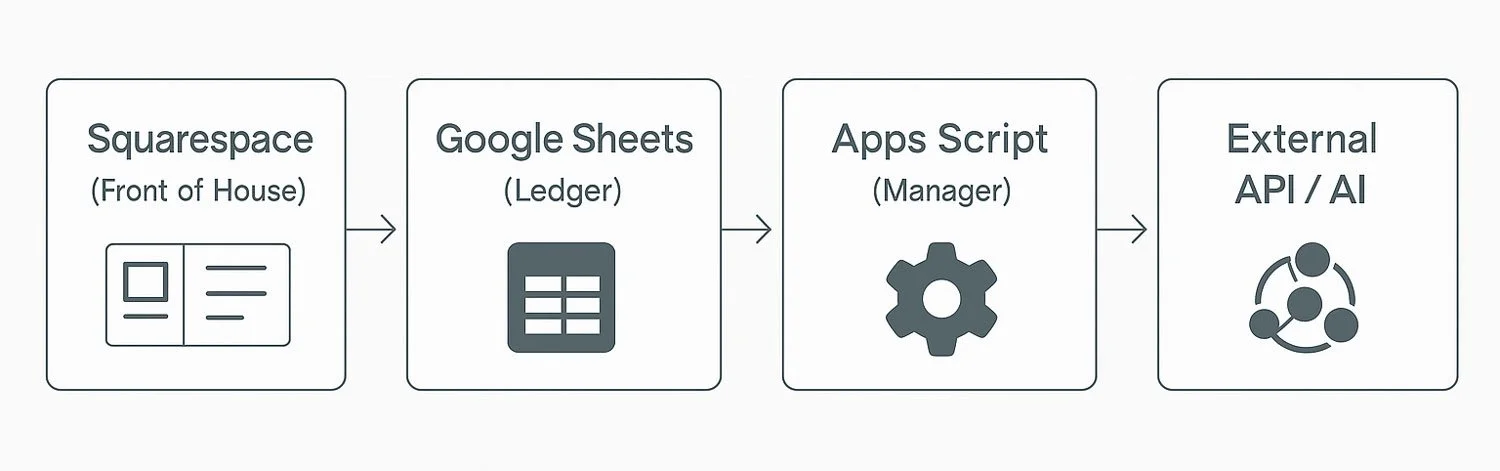
Squarespace handles the experience. Google Sheets catches the data. Apps Script decides what happens next.
Quick wins - Solving everyday Squarespace headaches
Even simple logic can have a huge impact. Here are the two fastest wins that transform client workflows overnight.
1. Cure inbox blindness with smart notifications
Every designer knows the pain of digging through identical subject lines. Form Submission – General Enquiry tells you nothing.
But if a Sheet triggers a Script, your inbox subject lines can suddenly look like this:
New Lead: Wedding Photography – Claire Johnson – 12 March
Urgent: XYZ is requesting support
New Product Enquiry: Oak Wine Rack
You see the importance at a glance.
You know who needs a reply first.
You stop missing the things that matter.
A simple workflow tip makes this even cleaner:
auto-archive the generic Squarespace notifications in Gmail so they never touch your primary inbox. Let them exist as a quiet audit trail while the intelligent ones do the real work.

Static vs smart notifications: the difference between inbox blindness and instant clarity.
2. Route messages dynamically - One form, many destinations
Most sites have a single contact form but multiple departments: Sales, Booking, Billing, Support.
Squarespace sends everything to one inbox. Someone then forwards each email manually – a repetitive task that wastes time and creates delays.
Apps Script solves this elegantly.
If a user selects Sales, the email goes directly to the Sales Director.
If they select Billing, it goes to Finance.
If they select General Enquiry, it might route to an assistant or a shared inbox.
One form. Many possible journeys. No manual forwarding. No bottlenecks.
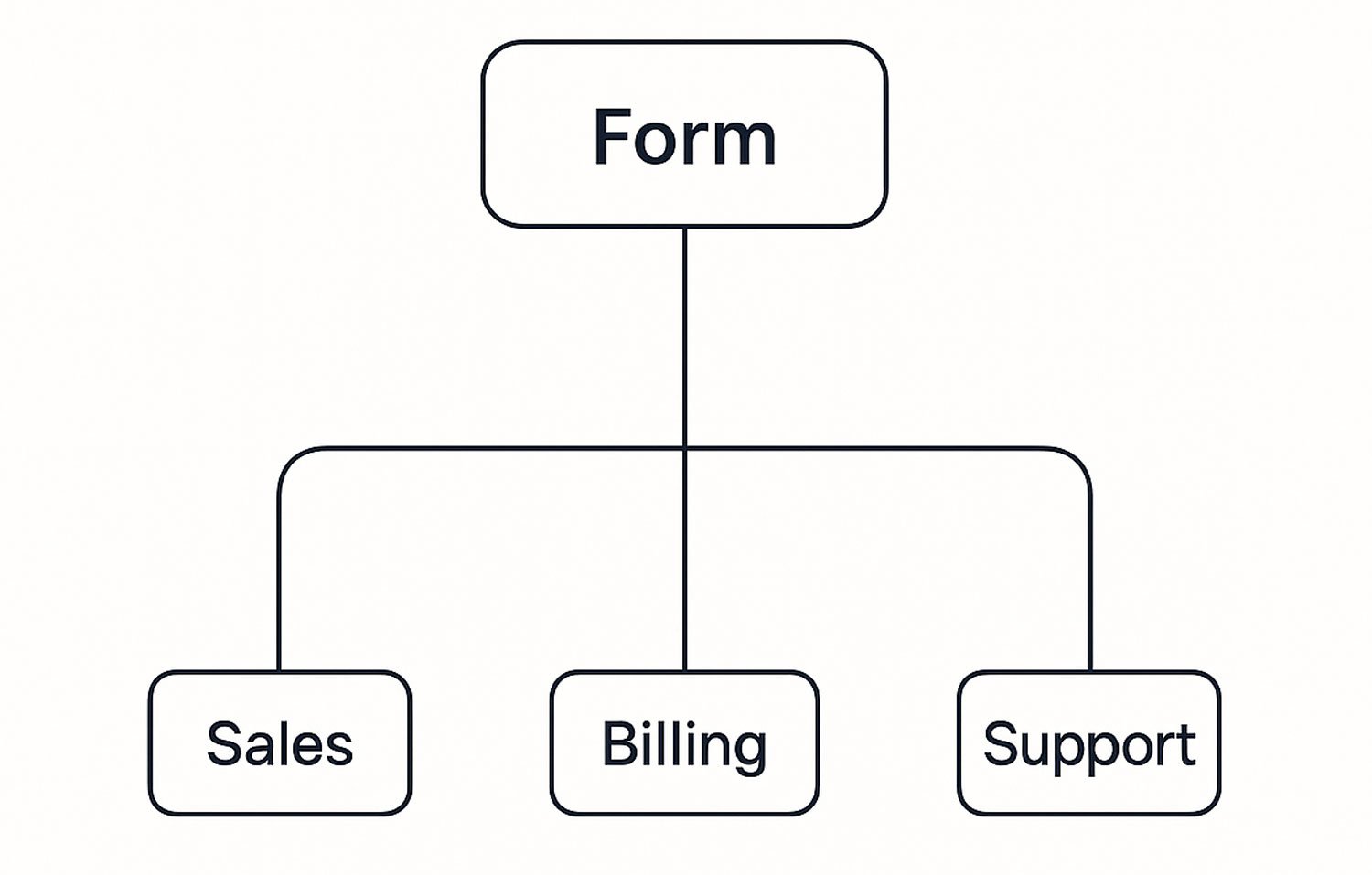
One form. Many possible journeys. The right inbox every time.
Case Study 1 - The Logic Layer (CRM integration)
This approach really shines when a business needs the form to do more than collect data. A recent example was a Family Registration workflow for City Church Chicago, where the objective wasn’t simply to gather names – it was to build proper household structures inside Planning Center Online PCO), their CRM.
Here’s what needed to happen each time a parent filled out the form:
Check if the parent already existed in the CRM.
If yes, update their record in PCO.
If no, create a new one.
Check if a spouse was listed in PCO and whether a matching email already existed.
Handle children intelligently – do they already exist? Should they be created? Are they part of this household or another?
Log the result - so City Church Chicago staff can see what occurred without digging into the CRM itself.
None of this could happen natively inside Squarespace.
None of it required Zapier.
None of it required a developer spinning up a server.
The workflow was simple:
Form submitted → Google Sheet
New row detected → Apps Script wakes up
Script calls the CRM API, performs the logic, writes the outcome to the Sheet
Admin sees at a glance:
Parent exists
Spouse merged
Three children added
Household updated
The user stays on a beautiful Squarespace page.
The heavy lifting happens invisibly in the background.
And the organisation gets reliable, consistent data without the usual headaches.
Case Study 2 - The Intelligence Layer (AI-powered features)
Logic is powerful – but the moment you add AI into the system, the possibilities widen dramatically.
A recent example is a collaborative storytelling tool built entirely with:
a Squarespace form
a Google Sheet
a Script calling Gemini
a static JSON file hosted on GitHub
Here’s how it works:
Visitors read the current story and enter the next line in a form.
The Sheet catches the input and hands it to Apps Script, which sends it to Gemini.
The AI produces a response, which the script formats and writes to a JSON file.
Squarespace then displays the updated content on the site via Javascript.
From the visitor’s perspective, they’ve interacted with an intelligent tool built directly into your site.
From the builder’s perspective, you’ve created a micro-SaaS product entirely out of components you already had.
It’s a compelling idea: you can build AI experiences inside Squarespace without waiting for Squarespace to add them.
Extending the stack for speed and scale
Once you start treating Squarespace forms as triggers rather than endpoints, an interesting thing happens: your stack begins to grow in small, elegant ways.
Take the Storyteller app as an example. At first, the workflow was simple – a form submission hit a Google Sheet, Apps Script called Gemini, and the result was written back to a JSON file. It worked, but there was one issue: performance. Serving a JSON file directly from Google Drive is fine in development, but not ideal once users expect instant results.
The solution was to extend the stack by two steps:
Apps Script pushes the AI output to GitHub.
GitHub automatically pipes that JSON to Cloudflare, where it’s cached globally.
Squarespace fetches the JSON from the nearest Cloudflare edge location.
The cost?
Roughly $3 per month for a GitHub paid plan and the annual cost of a Cloudflare domain – usually the price of a coffee or two.
The gain?
A dramatic improvement in load time, reliability, and scalability.
This is worth keeping in mind. You don’t need to build infrastructure. You don’t need servers. You don’t need a DevOps team. But a few well-chosen, low-cost components can take an app from “clever prototype” to “fast enough for real users.”
These micro-extensions are the quiet secret of API-enhanced Squarespace builds. Each one gives you a little more performance, a little more polish, and a lot more confidence when you’re delivering client-facing tools.
Your site is bigger than it looks
Squarespace excels as the front of house. It gives you consistency, design quality, structured content, and a user experience that feels fully integrated.
Google Workspace excels as the invisible backend. It offers a serverless engine capable of analysis, logic, AI, CRM synchronisation, and any workflow you can define.
When you connect the two, you stop saying “Squarespace can’t do that” and start saying “We can build that.”
The form block is no longer the end of the journey.
It’s the trigger that starts it.
And the best part? You don’t need to become a full-time developer to make this work.
At its simplest, all you really need is a form, a spreadsheet, and a good idea. Modern AI tools can generate much of the glue code for you. Gemini, ChatGPT, and Claude can all produce Apps Script that gets you surprisingly close on the first attempt.
But here’s the more honest – and more encouraging – reality for professionals:
building reliable workflows isn’t about writing perfect code; it’s about understanding the process.
Vibe coding - use the AI as your coding assistant, not the chief developer
For straightforward automations, you can “vibe code” with AI.
Describe the job, paste in your schema, and let the model suggest the structure. It’s often all you need.
For more advanced systems – the kind agencies build for clients – you simply need to know how Apps Script behaves. Triggers, execution limits, timeouts, row detection, JSON structures, and API authentication all have patterns. Once you learn them, you’ll find that:
faulty AI-generated code becomes a starting point, not a blocker
you can fix issues by pasting the result into another AI and describing the error
you can refine logic iteratively, using AI as a collaborator
you spend more time designing workflows and far less time wrestling with syntax
In other words: your expertise + AI = a superpower.

Vibe debugging - AIs often get stuck in a rut. Give your buggy code to different AIs for a fresh pair of eyes.
Conclusion - The technical barrier is lower than ever, and the creative ceiling is higher than people realise.
This is why the invisible backend approach is so powerful.
With the right mindset, any Squarespace agency or power user can deliver functionality normally associated with custom software. You’re not limited to what the platform exposes on the surface. You’re only limited by imagination, architecture, and the willingness to explore.
Up next..
This is just the beginning. In Part 2 of this series, we’ll take these principles beyond notifications and into real operations. We’ll look at how Google Sheets and Apps Script can power the backend of your business - pulling data from the Squarespace API, generating kitchen prep lists, creating delivery workflows, sending reminders, and turning complex order data into something your team can actually use.
For now, the key takeaway is simple:
Your Squarespace site already has a brain waiting to be switched on.
Modern AI tools make it easier than ever to wire it up.
And the moment you do, the humble Form Block becomes one of the most powerful features on the platform.